
Passkeys, Explained: The Slow Death of the Password
Passkeys swap stolen, reused passwords for cryptographic keys held on your device. How FIDO2 and WebAuthn work, why phishing fails, and what still breaks.

On this page
Key takeaways
- The FIDO Alliance estimated 5 billion passkeys were in active use worldwide as of May 7, 2026, with 75% of surveyed consumers having enabled at least one passkey.
- Google reported 800 million accounts using passkeys by 2024, Amazon reported 175 million customers, and Microsoft is making passkeys the default in Entra ID from September 1, 2026.
- A passkey stores a private key on a device or in a synced keychain and gives only the matching public key to the service, so a server breach leaks nothing reusable.
- Device-bound passkeys on hardware keys cannot be copied and are unrecoverable if lost, which is why NIST bars syncable passkeys at its highest assurance level, AAL3.
- FIDO Alliance data shows passwords still dominate in practice: 57% of surveyed organizations in 2026 still relied on password-based methods as the primary employee sign-in.
Every password you have ever typed is a secret you shared with someone else's server. That reusable secret, crossing the network and sitting in a database, is behind much of the credential crime on the internet. Passkeys change the unit of authentication: instead of proving you know a string, you prove you hold a key that never leaves your control. Security teams treat that as the first structural answer to phishing in decades, and it creates new problems around recovery, portability and lost devices.
Related reading: FBI Arrests OpenAI Employee Accused of Planting a Hidden Recording Device · Microsoft's October 2026 Patch Tuesday Sets a Record With 1,407 Fixes.
Why passwords keep failing
A password is a shared secret. The user stores one copy in memory or a manager; the service stores another, hashed, in a database. Anyone who obtains either copy can authenticate as the user, which produces a predictable set of failures.
- Phishing. An attacker clones a login page, the user types the password, and the attacker replays it. Complexity does not help, because the credential was surrendered voluntarily.
- Reuse. People repeat passwords across sites, so one breach unlocks many unrelated accounts.
- Breach dumps. Large credential lists circulate for years and feed automated attacks.
- Credential stuffing. Bots test leaked username and password pairs across many services at once, at a low cost per attempt.
The numbers are stubborn. Verizon's 2025 Data Breach Investigations Report, covering 12,195 confirmed breaches, found that stolen credentials were the leading initial access vector at 22% of breaches, with phishing at about 16%. It also found that 88% of basic web application attacks involved stolen credentials. As long as the credential is a secret that can be copied, those figures have a floor.
What a passkey actually is
A passkey is a credential that follows the FIDO2 standard, which combines the World Wide Web Consortium's WebAuthn specification with the FIDO Alliance's Client to Authenticator Protocol (CTAP). The design rests on public-key cryptography rather than a shared secret.
During registration, the authenticator (a phone, a laptop, a password manager or a hardware key) generates a fresh key pair for that account on that specific site. The private key stays with the authenticator; the public key goes to the service. At sign-in, the service sends a random challenge, and the authenticator signs it with the private key after the user verifies with a fingerprint, face, PIN or physical touch. The service checks the signature with the public key.
  REGISTRATION                          SIGN-IN
  ------------                          -------
  service ── create credential ──► browser/authenticator
                                        │
                        generate key pair scoped to this domain
                                        │
  service ◄──── public key ─────────────┘   (private key stays)

  service ── random challenge ──► browser/authenticator
                                        │
                    user verifies (face / fingerprint / PIN / touch)
                                        │
  service ◄── signed challenge ─────────┘   verify with stored public key
Because the private key never leaves the authenticator, a breach of the service yields only public keys. There is no password database to crack, and both the secret and the user's gesture stay local. Yubico's WebAuthn developer guide describes this as resistant to phishing, replay and server-breach attacks, with the service holding nothing but public information.
Why phishing and replay stop working
Two properties do the heavy lifting.
The first is domain binding. Every passkey is scoped to a relying party identifier, normally the site's domain. On a lookalike page, the authenticator either finds no matching credential or signs with a key the real service will never accept. The browser, not the user, checks the origin. This is what NIST calls phishing resistance through verifier name binding.
The second is replay resistance. Each sign-in carries a fresh random challenge that the authenticator signs, with the domain and challenge bound into the signed data, so a captured assertion cannot be reused. This differs from one-time codes: a TOTP or SMS code can be relayed in real time between the user and the site, which is why NIST does not treat manual code entry as phishing-resistant. Passkeys remove the value of a fake page entirely, because there is nothing to type and nothing to relay.
Synced passkeys vs device-bound passkeys
Passkeys come in two broad families.
Synced (multi-device) passkeys are duplicated to a cloud keychain so they work across a user's devices. Apple stores them in iCloud Keychain and documents that they are end-to-end encrypted and recoverable through escrow. Google Password Manager and Microsoft's ecosystem do the equivalent, and third-party managers such as 1Password, Bitwarden and Dashlane can hold them too.
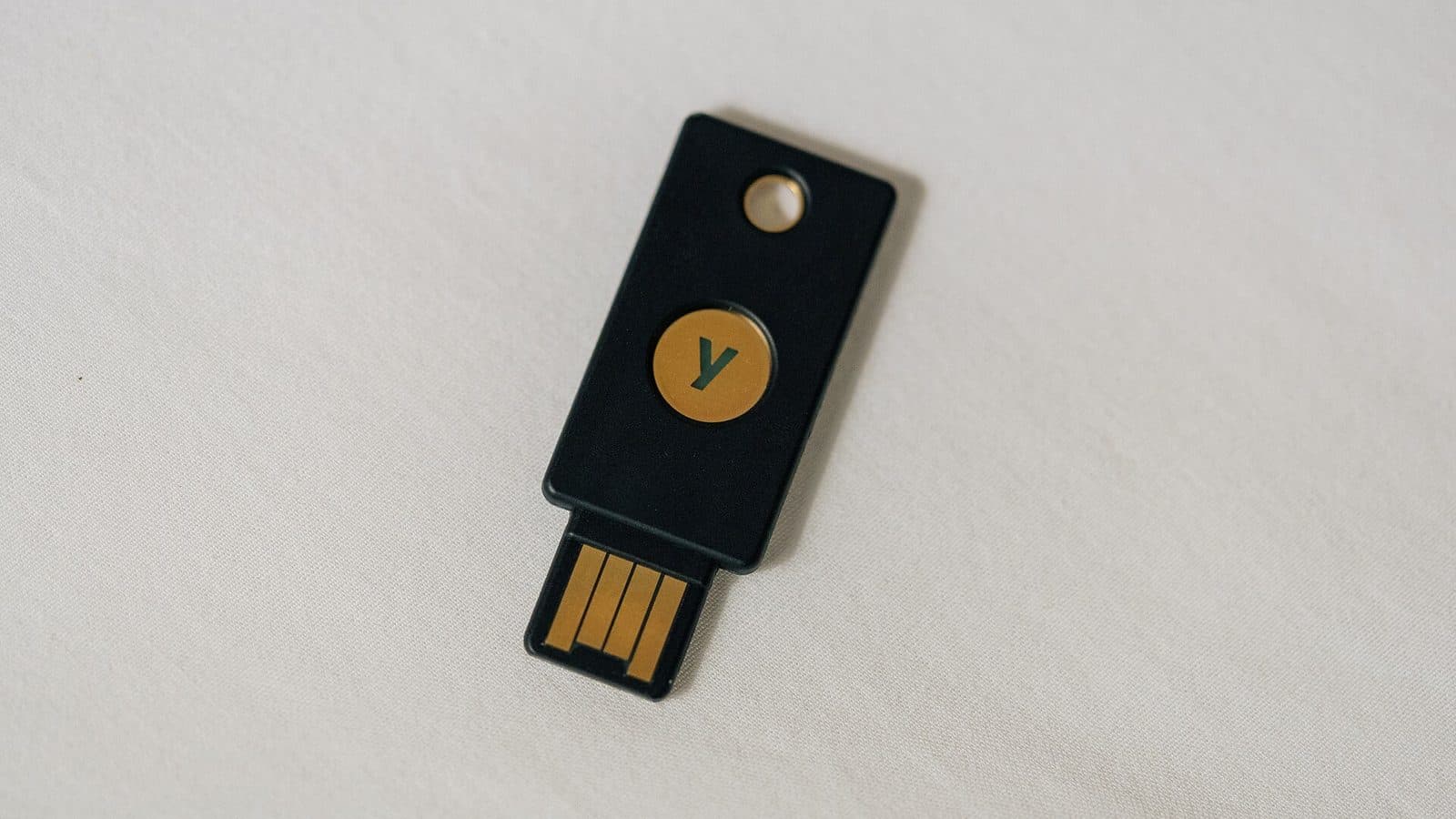
Device-bound passkeys are locked to a single authenticator and cannot be copied. A hardware security key such as a YubiKey keeps the private key inside a secure element; Yubico says FIDO2 credentials on a key cannot be accessed without the PIN or, on biometric models, the fingerprint. That gives organizations stronger lifecycle control, which is why device-bound keys are preferred for privileged accounts.
WebAuthn Level 3 exposes two flags that let a service tell the difference at registration: Backup Eligibility shows whether a credential may sync, and Backup State whether it currently is.
Regulators have drawn a line, too. A NIST supplement to SP 800-63B published in April 2024 allowed syncable authenticators at Authentication Assurance Level 2 for the first time. The current NIST SP 800-63-4 goes further: syncable authenticators, because their keys must be exportable, "SHALL NOT be used at AAL3." Convenience and the highest assurance level pull in opposite directions.
The "what if I lose my phone" problem
Recovery is where passkeys are weakest, because there is no password to reset. A service can only confirm identity another way and let the user register a brand new credential.
If the passkey was synced, the answer is usually calm: sign in to a replacement device with the same platform account and it is already there. Apple documents that iCloud Keychain can be recovered even if every device is lost, using account credentials, a text message to a registered number and the device passcode, with strict retry limits and escrow that Apple itself cannot read.
If the passkey was device-bound and the key is gone, the credential is cryptographically unrecoverable. That is why the FIDO Alliance and vendors such as Yubico recommend enrolling at least two credentials per account, ideally on different providers, so no single loss locks anyone out. The bigger risk sits one level up: losing the underlying Apple or Google account takes every synced passkey inside it at the same moment.
If the recovery path falls back to an email link or an SMS code, the account is only as strong as that fallback. A high-assurance passkey login bolted to a phishable reset flow simply moves the weak point.
Passkeys are not 2FA, not TOTP, and not a password manager
These terms get used interchangeably, and they should not be.
- A passkey is a cryptographic credential scoped to one account on one service. It can act as a single factor (device plus biometric) or as multi-factor (a hardware key requiring a PIN).
- TOTP is a rotating code, usually produced by an authenticator app. It still relies on a shared secret and can be phished by relay.
- SMS one-time codes are weaker still, exposed to SIM swapping and interception.
- A password manager generates strong passwords, but the password is still a shared secret that can be phished. Many now store passkeys too, making them a passkey provider rather than a substitute.
The mental model that helps
A passkey is the credential; the authenticator is where it lives. A phone's secure enclave, a laptop's biometric sensor, a password manager's vault and a hardware key are all valid homes for the same kind of credential, with different security and portability tradeoffs.
Where adoption actually stands
Passkeys have crossed from experiment to default in several of the largest consumer and enterprise services.
- The FIDO Alliance estimated 5 billion passkeys in active use worldwide on World Passkey Day, May 7, 2026.
- Its State of Passkeys 2026 report, based on 11,000 consumers and 1,400 enterprise decision-makers surveyed by Sapio Research in April 2026, found 90% awareness, 75% having enabled at least one passkey, and 49% using them regularly. Among organizations, 68% had deployed or were deploying passkeys for employee sign-in.
- The FIDO Passkey Index, drawing on data from Amazon, Google, Microsoft, PayPal, Target and TikTok, reported that 93% of accounts were eligible for passkeys, 36% had one enrolled, and 26% of sign-ins already used them. Passkey logins succeeded 93% of the time, against 63% for other methods.
- Google said in 2024 that 800 million accounts were using passkeys, after making them the default for personal accounts in October 2023. Amazon reported 175 million customers in October 2024, with sign-ins up to six times faster.
- Microsoft has gone furthest on the enterprise side, making passkeys the default in Entra ID from September 1, 2026, auto-enrolling users on SMS or voice, and planning to retire native SMS and voice delivery on February 1, 2027.
The pattern: consumer platforms, not IT departments, are driving the volume, and enterprises are pulled along by the same defaults.
Enterprise deployment basics
For administrators, the shift is less about flipping a switch and more about credential lifecycle design.
Most deployments start by mapping which accounts can use passkeys and which authenticator types they will accept. In Microsoft Entra ID, the passkey profile model introduced in 2026 lets admins choose device-bound passkeys, synced passkeys, or both, and target them to groups. Regulated or high-value accounts typically enforce attestation and restrict registration to approved hardware so only known devices can enroll.
The practical questions are recovery, help-desk load and fallback. Organizations moving to passkeys report fewer password resets and higher login success, but they still need a recovery process for a lost device, and that is where social engineering concentrates.
The recovery path is the new attack surface
A passkey makes the front door extremely hard to pick. If the back door is a support agent who resets access after a convincing phone call, attackers will simply walk around. Treat recovery as part of the authentication design, not an afterthought.
Portability and the FIDO Credential Exchange work
The largest unresolved gap is lock-in. Apple, Google and Microsoft keychains do not sync passkeys to one another, so a user who switches platforms has historically had to re-register credentials site by site.
The FIDO Alliance is trying to fix that with two companion specifications, the Credential Exchange Protocol (CXP) and the Credential Exchange Format (CXF), drafted by a group that includes Apple, Google, Microsoft, 1Password, Bitwarden, Dashlane, NordPass, Okta, Samsung and SK Telecom. The goal is a standard way to move passkeys between providers, encrypted by default and never made in the clear. CXP defines the transport using HPKE encryption; CXF defines the data structure, including a passkey dictionary that carries the private key in encrypted form.
Progress is real but incomplete. CXF reached Proposed Standard status on March 9, 2026, while CXP remained an early review working draft. Until both are final and widely implemented, switching providers still means some manual re-registration.
“The data in the Passkey Index marks the first time we have been able to measure the actual utilization and performance of passkeys.” — Andrew Shikiar, CEO of the FIDO Alliance, October 2025
Where passwords persist
The honest version of this story is that passwords are not disappearing on any near timeline. The FIDO Alliance's own 2026 research found that 57% of organizations still rely on password-based methods as the primary way employees sign in, even as 82% call fully passwordless authentication an eventual goal and only 28% have reached it. Nearly half of consumers have abandoned a purchase because they could not remember a password.
Several gaps remain structural:
- Legacy and shared systems. Old applications, kiosks, industrial systems and shared accounts often cannot accept a passkey at all.
- Platform account dependence. Synced passkeys are only as safe as the Apple, Google or Microsoft account protecting them; compromise that account and they are exposed together.
- Sync fabric risk. Cloning keys to the cloud creates a target that does not exist for a device-bound key, which is why NIST requires encrypted storage and AAL2-equivalent protection of the sync fabric.
- Phishing resistance is not invulnerability. A passkey stops a fake login page. It does not stop malware on an unlocked device, session-token theft after a legitimate login, or abuse of a weak recovery channel.
What to watch
The direction is settled, even if the timeline is not. The questions worth tracking are the ones the standards bodies are still working through.
- Credential exchange. Whether CXP and CXF are finalized and adopted by the major providers is the single biggest determinant of whether passkeys stay portable.
- Recovery standards. How services verify identity when a device-bound credential is gone, and whether those flows avoid reintroducing phishable SMS or email fallbacks.
- Enterprise timelines. Microsoft's February 2027 retirement of native SMS and voice in Entra ID tests whether large organizations can migrate at scale without locking users out.
- New uses. Passkeys are being explored for age verification and proving a human is present, pushing the ecosystem into policy territory it has not visited before.
None of this makes the password vanish next year. The default is changing: new accounts and devices increasingly get a key pair first and a password, if anything, second. The slow death of the password is less an execution than a retirement.
The one-sentence version
A passkey replaces a shared password with a key pair whose private half never leaves your device or synced keychain, which kills credential phishing and replay, but pushes the hardest problems into account recovery, portability and the fallback paths that can quietly undo the security gained.
Cover photo: Tony Webster, via Wikimedia Commons, licensed under CC BY 2.0.
Tags
Frequently asked questions
- Are passkeys the same as two-factor authentication?
- No. 2FA usually layers a one-time code on top of a password, and those codes can be relayed by a phishing site in real time. A passkey is a cryptographic key pair, so nothing the user knows or types is shared with the server and there is no code to intercept.
- What happens if I lose the phone that holds my passkey?
- If the passkey was synced to iCloud Keychain, Google Password Manager or another provider, it reappears when you sign in to the replacement device. If it was device-bound, such as on a hardware security key, that credential is gone and you fall back to the account recovery path the service offers.
- Do passkeys work across iPhone and Android?
- A service can accept passkeys created on either platform, and cross-device sign-in lets one phone authenticate a nearby computer. Apple, Google and Microsoft keychains do not sync passkeys to each other, so moving between ecosystems usually means registering a new passkey.
- Are passkeys unphishable in every situation?
- Passkeys defeat credential phishing because the authenticator checks the site's real domain and the private key never leaves it. They do not stop malware on an unlocked device, session-token theft after a successful login, or an attacker who abuses a weak account recovery process.

TPW Editorial
Editorial Team
TechPastWeek's editorial team reports and edits every story we publish. We research each piece against primary and credible secondary sources, and a human editor reviews and signs off before it goes live.